
Agentic AI
Vibe Coding
AI Workflow
Solo Shipped
Establishing a prompt structuring
standard for AI website builders.
AI website builders promise effortless creation, but users struggle to translate
vision into actionable prompts. PromptR bridges this gap with structured
guidance — turning guesswork into a repeatable, reliable process.
PromptR — live product walkthrough
30+
Active users on the live tool
3×
Fewer iterations to reach
desired output
95%
Accuracy — websites match
user vision on first attempt
Role
Solo Designer & Builder
End-to-end: research,
design, ship
Tools
Claude, Figma Make
GitHub
Status
Live & Shipped
prompt.figma.site
Overview
The problem in one sentence
AI website builders deliver wildly inconsistent outputs — a tiny wording change can blow up an
entire layout — because users have no structured method to communicate their vision to the
model.
Context
AI website builders like Figma Make, Framer AI, and similar tools promise effortless creation. But
the gap between what users imagine and what the AI produces is massive. The root cause isn't
bad AI — it's unstructured prompts. Users describe their vision in vague, freeform language that
AI models can't reliably interpret.
PromptR was built to solve this at the source: give users a structured prompting framework that
mirrors how AI models actually process information.
Goals
Eliminate trial-and-error
Replace the frustrating loop of
regenerating, undoing, and
nudging prompts with a clear,
guided input process.
Make intent translatable
Give users a reliable
vocabulary to express
hierarchy, tone, layout, and
behavior in a way AI can act
on.
Enable repeatable results
Build a framework consistent
enough that users — and
organizations — can train on it
and expect predictable
outputs.
User & Problem
Who uses AI website builders?
Three distinct user groups — all frustrated by the same underlying problem: the gap between
what they want and what the AI gives them.
Designers
Have strong visual intent but
struggle to translate taste and
layout decisions into text that
AI can interpret.
Developers
Comfortable with precision but
frustrated by the
unpredictability of AI outputs
from natural language alone.
Non-technical Creators
Most excited by AI tools, most
let down — no prompting
literacy and no safety net
when results go wrong.
The 4 core pain points
—
Unpredictable layouts from
similar prompts
— small wording changes cause dramatic quality swings
with no explanation
—
No clear method to
communicate vision
— users have no shared vocabulary for expressing
hierarchy, tone, or constraints
—
Frustrating trial-and-error
cycles
— regenerating, undoing, and nudging consumes the time
savings AI promised
—
High
abandonment
rates
— users stop believing the tool works and leave, not because the AI is
bad, but because the interface failed them
When tiny wording tweaks blow up the layout, users
don't think "AI is stochastic." They think
"this thing is
unreliable."
Once trust drops, usage follows. Fast.
Analysis
Diagnosing the real failure mode
The problem wasn't the AI's capability. When tested with well-structured inputs, AI website
builders produced excellent results. The failure was consistently upstream — in how users
formulated their prompts.
Why this matters beyond UX frustration
Trust collapses faster than it builds
Users attribute inconsistent AI outputs to the tool
being unreliable — not to their own prompting.
Once that perception forms, the product loses
the user permanently.
Creative intent gets lost in translation
Without a stable way to express hierarchy, tone,
or constraints, users can't communicate vision at
all. They're guessing. The AI is guessing. Both
lose.
Time savings turn into time debt
These tools promise speed. Instead users enter a
loop of prompt nudging, regenerating, and
undoing. The cost isn't just minutes — it's
cognitive fatigue.
Organizational adoption is blocked
Without consistent behavior, users cannot form
mental models. This makes training,
documentation, and standardization impossible
for teams and orgs.
The breakthrough insight
After testing multiple prompting approaches against AI website builders, two patterns emerged
consistently:
—
Pattern
Recognition
AI performed best with specific, structured logic rather than vague
freeform descriptions
—
Category
Separation
Visual tone, functional requirements, layout, and behavior each needed to be
defined independently, not blended into a single paragraph
The problem wasn't creativity. It was organisation. Users
had the vision — they just had no container to put it in.
Design Process
The framework — Vibe, Intent, Blocks, Enhancers
The core design decision was the prompting framework itself. Rather than a freeform text input,
PromptR breaks the prompt into four clearly separated categories — mirroring exactly how AI
models parse and weight information.
Layer 01
Vibe
Define the tone, style, and atmosphere of the
website. Mood, aesthetic references, visual
energy — what should it feel like?
Layer 02
Intent
Define the purpose and intention. What is this
website for? Who visits it? What action should
they take?
Layer 03
Blocks
Define the building blocks for each page —
sections, components, content hierarchy,
layout structure.
Layer 04
Enhancers
Add polish and interactivity (optional).
Animations, micro-interactions, design system
imports, output format preferences.
User Flows — 2 core journeys designed
Two distinct flows power the product — the primary prompt generation journey, and the
secondary community sharing loop.
1
Core Prompt Generation Flow
Land on PromptR
Start New Prompt
Step 1 — Define Vibe
Tone · Style · Atmosphere · Aesthetic references
Step 2 — Define Intent
Purpose · Target audience · Desired action
Step 3 — Define Blocks
Sections · Components · Content hierarchy · Layout
Step 4 — Add Enhancers (optional)
Animations · Design system imports · Output format
Generate Prompt
AI Website Built ✓
Output format?
Markdown
.md file
JSON
structured data
YAML
config format
Satisfied?
Yes
Copy Prompt
Paste into AI builder
No — refine
Edit any layer → Regenerate
2
Prompt Community Flow
Generated Prompt
Publish to
community?
Yes
Add title & description
Publish to Community Feed
Visible to all PromptR users
Others can browse, fork & reuse
Browse instead
Community Feed
Browse prompts by category
Found a useful
prompt?
Fork it
Customize → Use
Copy it
Use as-is
Prompt Reused & Community Grows ✓
Solution
Feature 01
Guided Questions
Instead of facing a blank text box, users answer a series of AI-assisted questions across the four
framework layers. Each question is designed to extract the specific type of information AI models
need in that category.
Guided question flow — replacing the blank prompt box with structured inputs
The guided approach removes the intimidation of prompt writing entirely. Users don't need to
know how to prompt — they just need to know what they want.
Feature 02
Referencing External Design System & Component Import
Users can import external design systems and component libraries to be included in the
generated prompt. This means the AI website builder receives not just content direction, but also
a specific visual system to conform to — dramatically increasing output consistency.

Import a design system — can be a .md file, link etc
star Feature 04
Custom Code Snippet
Users can add external code snippet for a specific component and that will automatically be structured in the prompt and ulimately Vibecoded.

Custom Code snippet
Secondary Feature
Prompt Community
Users can publish their generated prompts to a shared community feed, enabling reuse, iteration,
and collaboration. Prompts can be browsed by category, forked, and customized — turning
individual outputs into shared infrastructure.
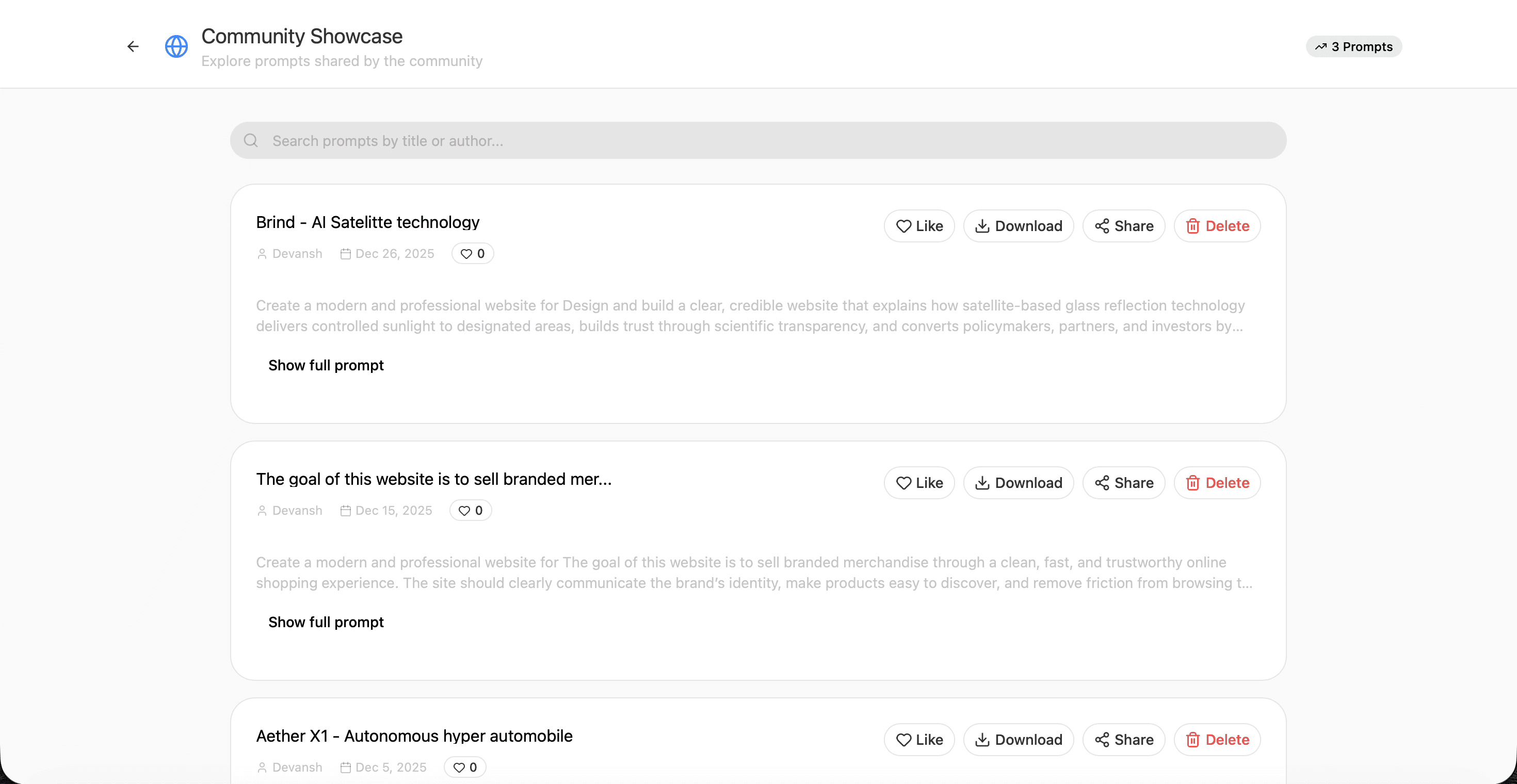
Prompt Community — shared prompts that others can fork and reuse
Try the live product
Email: friend@vibecoder.dev · Password: VibeCode2025!
Open PromptR →
into an intuitive, repeatable process
PromptR transformed prompt writing from guesswork
— making AI tools
accessible to everyday creators.
Outcomes
Results — 30+ Active Users
Designers, developers, and non-technical creators all benefit from the guided flow. PromptR has
an active user base using the tool to generate prompts for real projects.
30+
Active users on the
live product
3×
Fewer iterations to
reach desired output
95%
Accuracy rate —
websites match vision
on first attempt
100%
Consistency —
repeatable results
every time
Impact by user group
Designers
Can now communicate
aesthetic intent precisely —
Vibe layer replaces vague
mood descriptions with
structured tone definitions.
Developers
Get structured JSON / YAML
outputs they can immediately
integrate into AI builder
pipelines without reformatting.
Non-technical Creators
Guided questions remove the
need for prompting literacy —
they just answer what they
know and get professional
outputs.
Learnings
01
The interface IS the product, even when AI does the work. PromptR's value isn't in
generating text — it's in the structure that surrounds that generation. The framework is the
design.
02
Category separation unlocks AI performance. Mixing tone, structure, and purpose in a
single paragraph actively hurts AI output quality. Isolating them into distinct layers was the
single biggest improvement to output consistency.
03
Shipping fast revealed real usage patterns. Building with Claude and Figma Make let me
get a working product in front of users quickly. The 30+ active users surfaced use cases
and edge cases no amount of pre-launch research would have caught.
04
Community features are a distribution mechanism. The Prompt Community isn't just a
nice-to-have — it turns every power user into a growth driver. Shared prompts bring new
users who arrive with immediate context for the product's value.
What's next
—
Deeper AI assistance within each layer — auto-suggesting Vibe references based on
described intent
—
Version history for prompts — track how outputs evolve across iterations
—
Team workspaces — shared prompt libraries for design and dev teams
—
Integration with more AI builders beyond Figma Make
—
Analytics on which prompt structures produce the highest-rated outputs
In summary, I solved AI unpredictability by
Building a framework, not a feature
The four-layer structure (Vibe, Intent, Blocks,
Enhancers) mirrors how AI models weight
information — making it inherently more
effective.
Replacing blank inputs with guided questions
Removing the blank prompt box eliminated the
single biggest point of friction and confusion for
all user groups.
Shipping a real working product
Used Claude + Figma Make to build and ship the
tool end-to-end — validating the framework
with 30+ real active users.
Creating a shared knowledge layer
The Prompt Community turns individual use into
collective intelligence — every published
prompt makes the ecosystem smarter.
The future of AI tools isn't better models. It's better
interfaces for talking to them.