
Mobile App
HealthTech
Elderly UX
AI Integration
MediAlly — Medication management
that gives elderly users clarity,
confidence, and control.
A mobile application designed to help older adults manage daily medications with
minimal cognitive load — combining real-time tracking, AI assistance, and
caregiver visibility to reduce missed doses and medication errors.
MediAlly — full app walkthrough
Team
Devansh Tank(Product)
Pranav Suresh(Product)
Tools
Figma, Adobe Illustrator
Perplexity, ChatGPT, Slack
What We Did
End to End Design

Overview
What is MediAlly?
MediAlly is a mobile application designed to help older adults manage daily medications with
clarity, confidence, and minimal cognitive load. The product focuses on medication reminders,
intake tracking, and caregiver visibility to reduce missed doses and medication errors.
The problem in one sentence
Elderly patients manage multiple medications across different doctors, schedules, and formats —
with no unified system to track, understand, or share their medication regime safely.
Goals
Reduce medication errors
Help users track doses
accurately and avoid
dangerous overlaps or missed
medication.
Lower cognitive load
Design for elderly users —
large text, calm hierarchy,
simple flows that don't
overwhelm.
Enable care coordination
Give family members,
caregivers, and doctors
controlled visibility into
medication adherence.
User Research
Primary Users — Elderly Adults (50+)
Who: Older adults managing multiple prescriptions, often from different doctors, dealing with
complex instructions and age-related cognitive challenges.
Pain: Medications overlap, instructions are unclear, and there's no single place to see their
complete regime. Managing it feels like a second job.
Consequence: Missed doses, dangerous drug interactions, and anxiety around medication
management — all of which directly affect health outcomes.
Greg, 76
"Once my blood pressure
medicine overlapped with a
new prescription, causing
alarming fatigue."
Kimberly, 57
"Sometimes it feels like
managing my mother's
condition is like a second
job."
Robert, 62
"Listing medications across
multiple doctor's offices is
nerve-wracking because I'm afraid I'll forget something."
Secondary Users
Family Members & Caregivers
Need visibility into whether their loved one is
taking medications on time. Currently have no
reliable way to check without asking directly.
Doctors & Nurses
Need clear, current medication lists from
patients. Fragmented records lead to prescription
conflicts and delayed treatment decisions.
Core Pain Points
Complex / incomplete
instructions
Medication labels and
directions are often too
technical for elderly patients
to act on confidently.
Polypharmacy & age
Managing multiple
medications dramatically
increases the risk of errors,
especially in older adults.
Forgetting doses
The most common issue in
home settings — with no
reminder system, adherence
drops significantly.
Medication mismanagement isn't a willpower problem.
It's a system design problem.
Analysis
Research Findings
We ran a mixed-methods research plan combining primary and secondary research to validate
our initial assumptions and uncover the real scope of the problem.
15
In-depth user
interviews
32
Survey responses
40+
Secondary research
articles via Perplexity
70%
Survey participants
aged 50–80
Key findings from secondary research
—
33% of home medication errors stem from complex or incomplete instructions.
—
67% accuracy loss in repeating instructions linked to language barriers and health literacy
gaps.
—
30 – 38% higher error rates in patients with polypharmacy (multiple medications) and age-
related decline.
—
Drug name and label confusion is the leading cause of dispensing errors in home settings.
—
Forgetting doses and stopping early is the most common adherence failure — especially without reminders.
User Interview breakdown — who we heard from
10 Patients
Primary medication users,
mostly 50+, managing 2–6
prescriptions simultaneously.
3 Family Members
Adult children managing a
parent's medication alongside
their own schedule.
2 Doctors
Clinicians who regularly
receive incomplete or
outdated medication lists from
patients.
Concept remodel — what the research changed
Insights from interviews, surveys, and secondary research led us to reframe our initial
predictions. We had assumed the problem was primarily about reminders.
The real problem was
cognitive burden and fragmentation
— users didn't just forget, they were overwhelmed by a
system that wasn't designed for them.
This shifted our target audience to adults 50 and above, and pushed us to prioritize calm
information architecture over feature density.
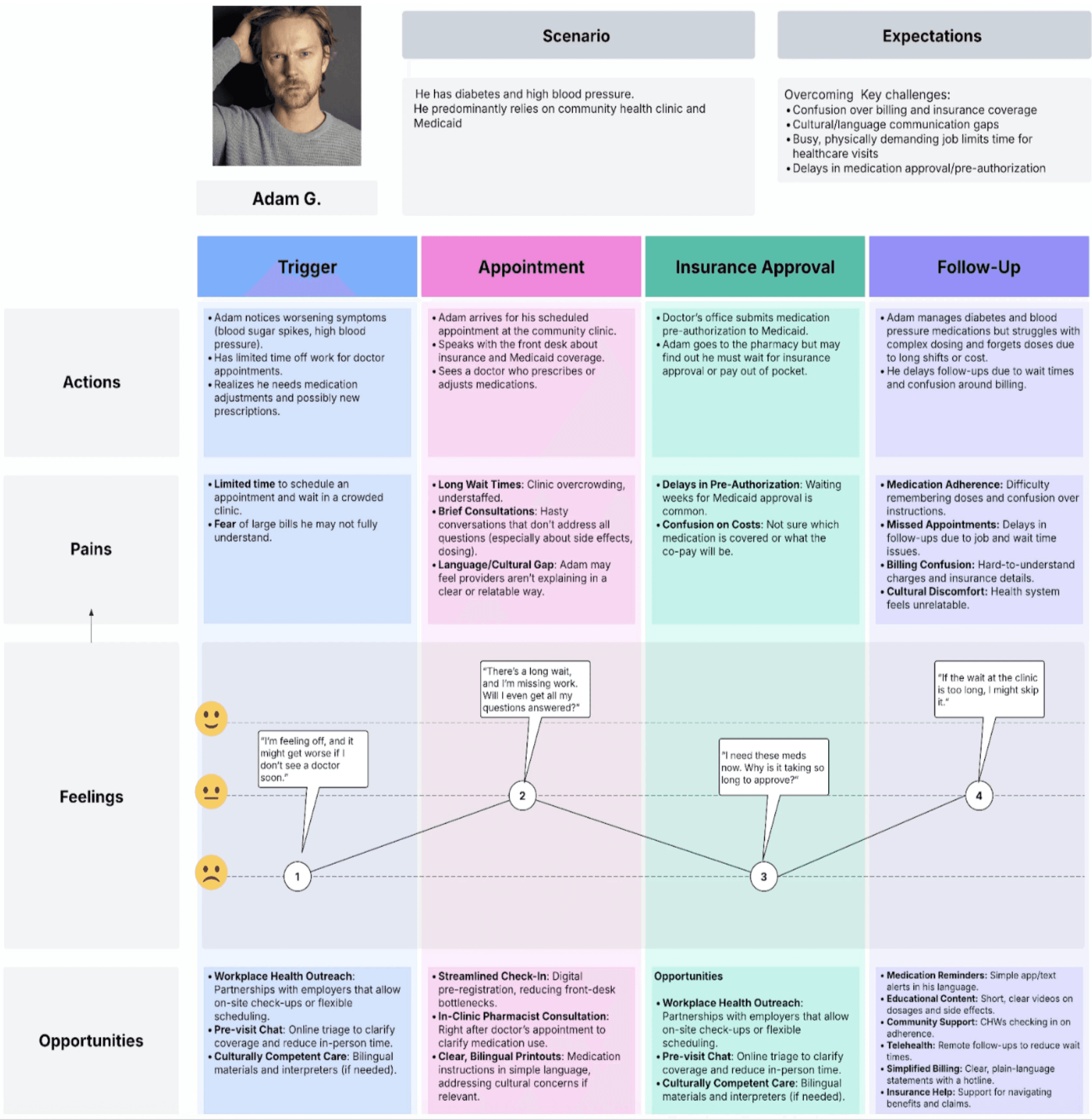
Persona synthesis & jobs-pains-gains framework from user interviews
We had assumed the problem was reminders. The real
problem was fragmentation — a system that was never designed for elderly users.
Design Process
Jobs, Pains & Gains — the design brief
We translated user interviews into a structured persona framework to ensure every design
decision mapped back to real user needs.
Jobs — Tasks to finish
Pains — Challenges faced
Gains — Desired outcomes
Manage complex medication
regime
Unclear instructions
Tailored assistance
Understand medicines and
side effects
Inadequate patient education
Educating patients simply
Access affordable healthcare
coordination
Poor care coordination
Simple coordination of care
Improve communication with
healthcare workers
Delays in treatment
Increased safety
Receive timely, clear medical
care
Financial barriers
Economical solutions
Branding & Design System
Typography
DM Serif Display + SF Pro Text.
Heading Bold(24px), Title Medium (20px), Body Light (16px).
Color
Primary blue #2663EB for trust and clarity. White
backgrounds for maximum legibility. High
contrast throughout.
Information Architecture
Dashboard
Overall medicine schedule + health statistics.
The central hub — everything accessible in 2
taps.
AI Chatbot
Address general health concerns, medication
directions, and side effects in plain language.
Manage Users
Add/remove family members, doctors, caregivers
with tiered access controls.
Device Connection
Connect the MediAlly dispensing device —
battery health, pill count, connection status.
User Flows — 3 core journeys designed
Each flow is mapped from the user's first tap to task completion, including decision points and
alternate paths.
1
Profile Setup Flow
Onboarding
New user?
Yes
Sign Up / Login
Profile Setup
Basic Info
Add Users
Family / Doctor / Caregiver
Allergies
Health Goals
Add Medication
Name · Dosage · Type · Time · Date
Set Reminder
No
Skip — Guest Mode
Limited features only
2
Add / Remove Users Flow
Home Screen
Settings
Manage Users
Add or Remove?
Add
Enter Email / Personal Info
Set Access Priority
Full / Limited / View-only
Confirm & Send Invite
Remove
Select User
Confirm Removal
Access revoked immediately
Add / Remove Medication Flow
Home Screen
Medicine Section
Add or Edit?
Add New
Add Medication Screen
Type name or scan QR code
Enter Details
Name · Dosage · Frequency · Directions
Set Notifications
Time · Repeat · Instructions
Save Medication
Edit / Remove
Tap Existing Medication
Pop-up detail screen
Edit or Delete?
Edit
Update fields → Save
Delete
Confirm → Removed
Solution
Feature 01 / 04
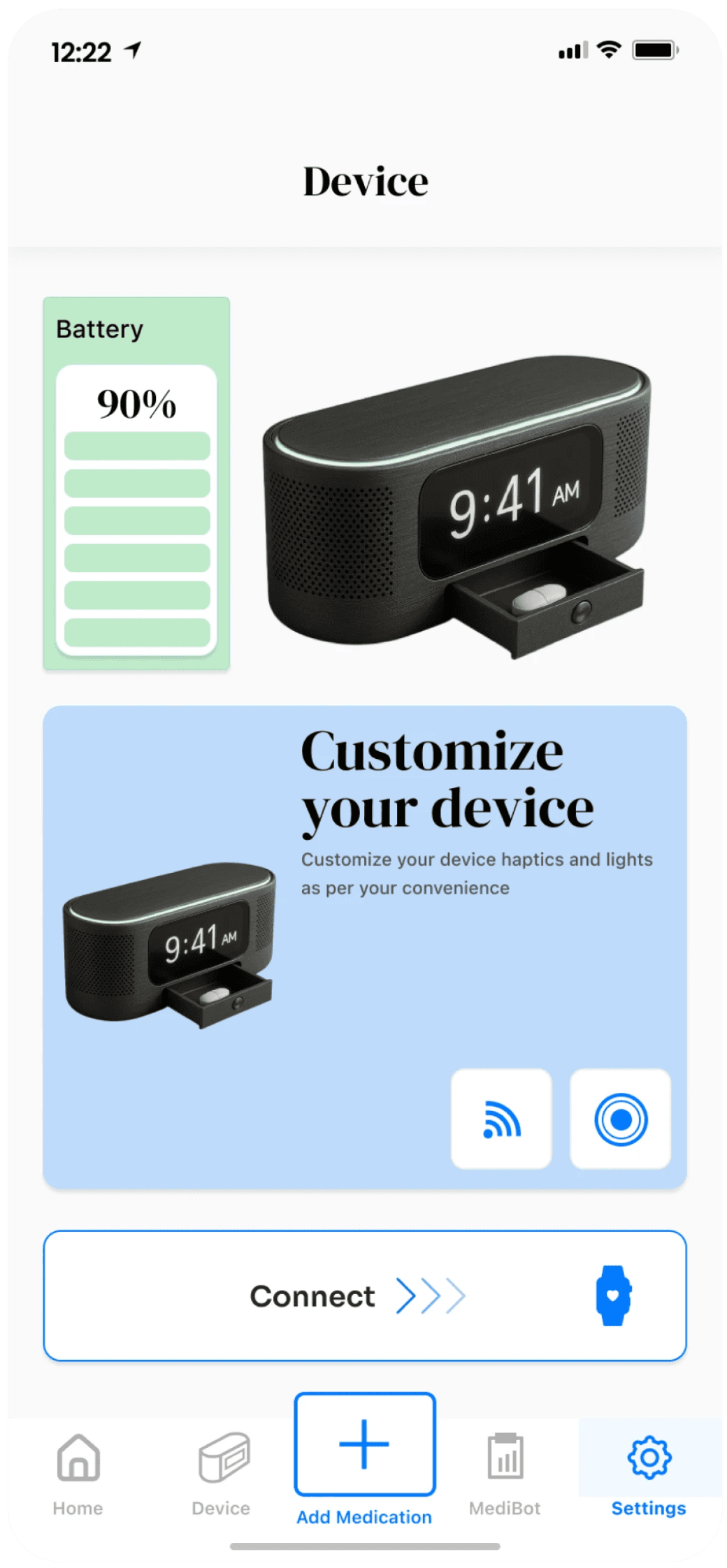
Medially Dispensing Device Connection
A hardware-software integration that connects to the
MediAlly auto-dispensing device. Users and caregivers
can monitor the device remotely — no more wondering
if a dose was taken.
→
For family
members
— track medication compliance from
anywhere
→
Device
connection
— view battery health, pill count, and
connection status
→
Notifications
— alerts when a dose is dispensed or a
refill is needed
Receive timely medical care
Improve care coordination
Feature 02 / 04
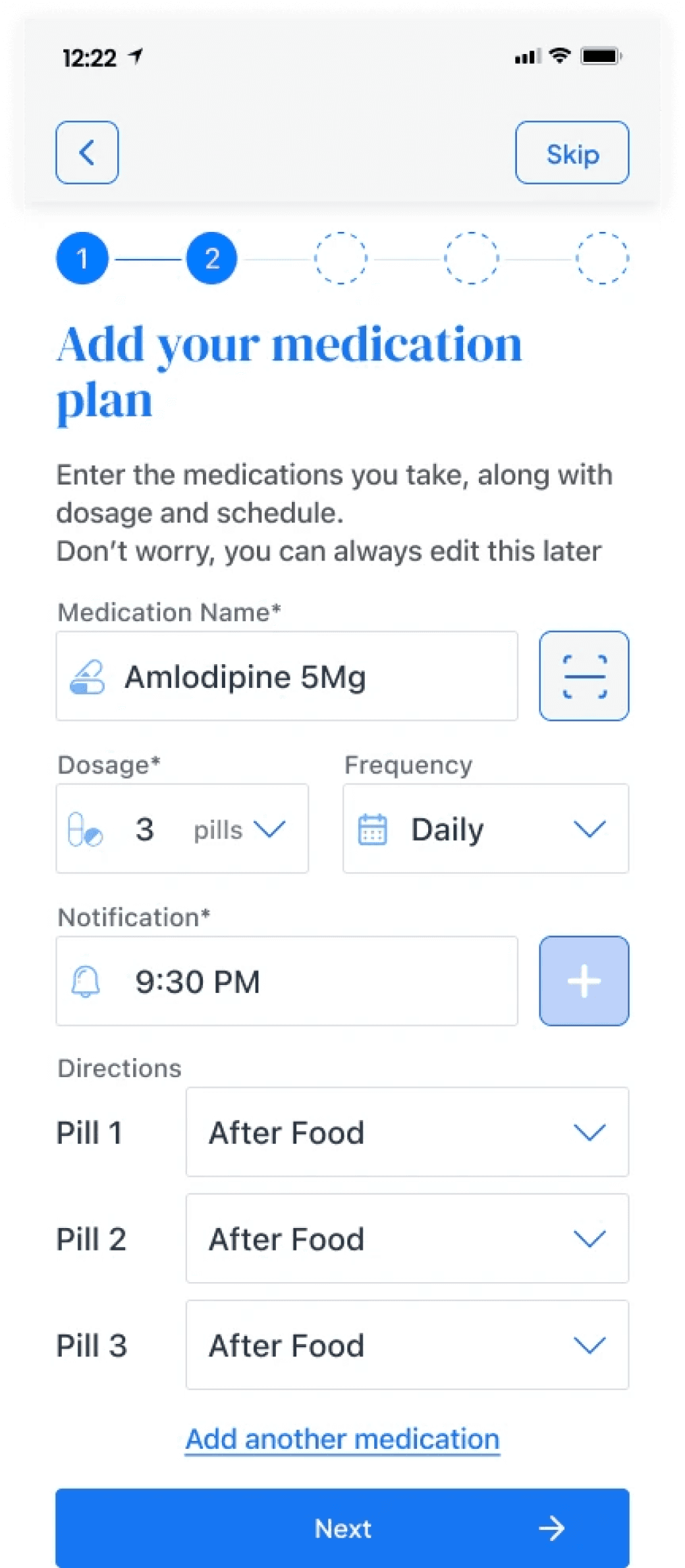
Real-Time Medication Tracking
The core feature — medication management made
seamless and intuitive. The color system, typography,
and structure are designed for accessibility across all
age groups, especially elders.
→
Add
medication
— by typing the name or scanning the QR
code on the package
→
Dosage &
frequency
— set the amount, time, and type
of dose
→
Reminder
setup
— notifications with directions for how to
take the medicine
Manage complex regime
Understand medicines
Timely care
Feature 03 / 04
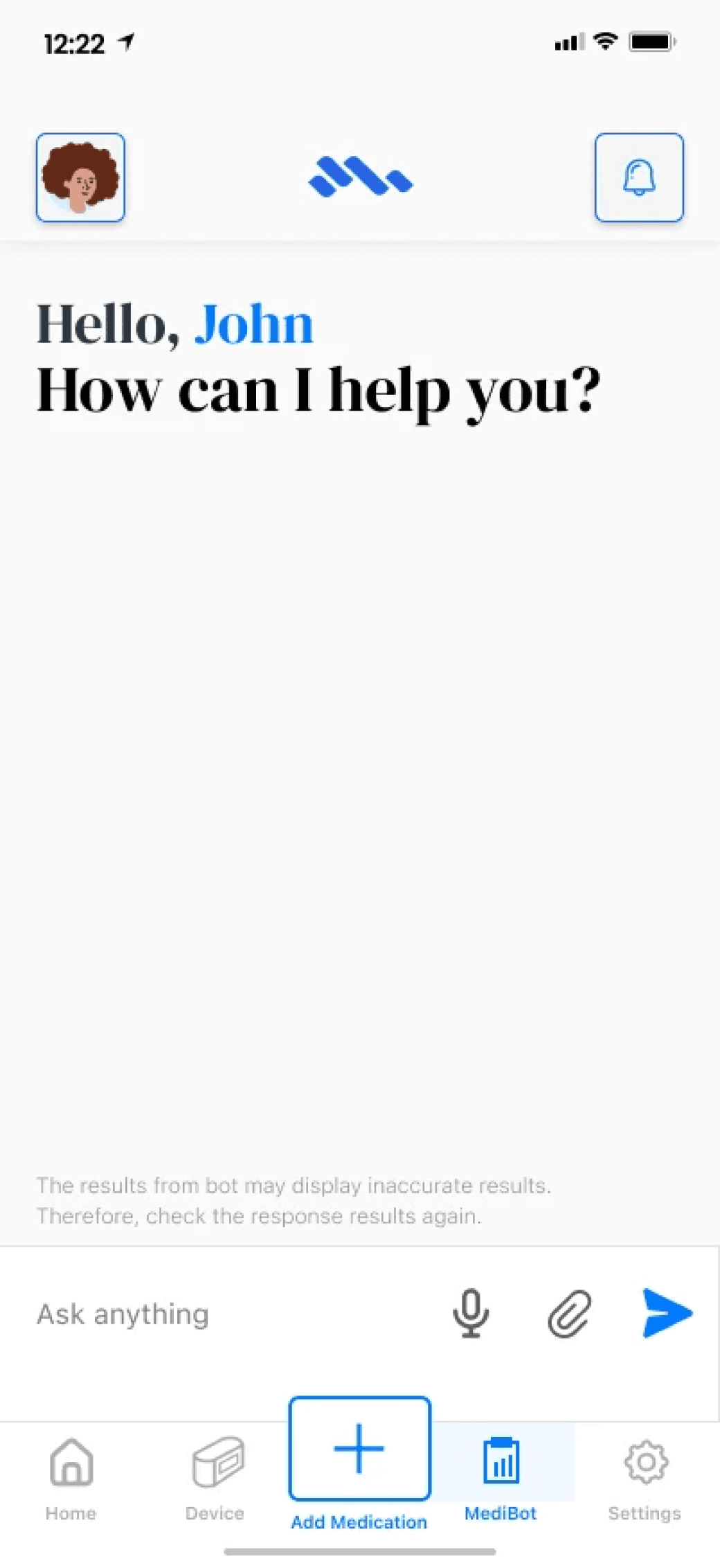
AI Chatbot Integration
An AI chatbot that serves as a personal health
assistant — answering medication questions in plain
language, available instantly at any time of day.
→
General health
concerns
— ask questions in natural
language
→
Medication
guidance
— how to take a medicine, what to
avoid, side effects
→
Quick
lookups
— drug name confusion resolved in
seconds
Understand medicines
Manage complex regime
Timely care
Feature 04 / 04
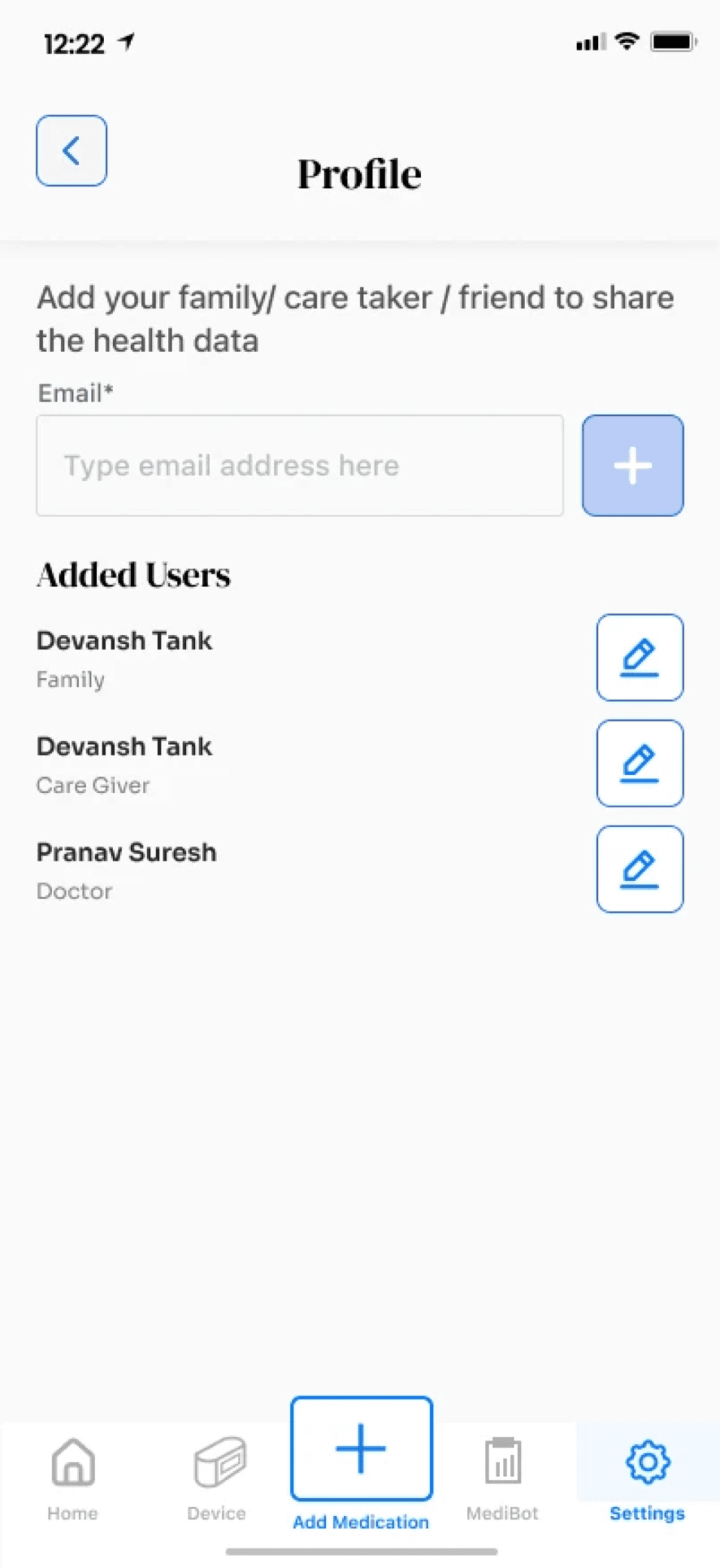
Multi-User Access
Controlled access for the people in the user's care
network — family members, caregivers, and doctors
each get a tailored view based on what they need to
know.
→
For family
members
— track medication routine and get
peace of mind
→
For
doctors
— professional-level view with full history
and ability to suggest changes
→
Tiered
access
— each user type sees only what's
relevant to their role
Improve care coordination
Understand medicines
Timely medical care
Every design decision was tested against one question:
would a 75-year-old understand this on the first try?
Outcomes
What was delivered
20+
Screens successfully designed
3
Core user flows end-to-end
4
Key features shipped in
prototype
Impact by area
Reduced Cognitive Load
Calm visual hierarchy, large text, and minimal UI
reduced the effort required to manage a complex
medication schedule.
Improved Adherence Potential
Reminder system with contextual medication
instructions directly addresses the #1 cause of
missed doses in home settings.
Care Coordination
Multi-user access gave family members and
doctors real-time visibility — closing the gap
between patient and caregiver.
Validated with Real Users
15 interviews and 32 survey responses ensured
every feature solved an observed, documented
pain point — not an assumption.
Learnings
01
Designing for the extremes helps everyone. Designing for elderly users with high cognitive
load forced us to simplify the entire system — which made the product better for every age
group.
02
Research changes the problem, not just the solution. We went in thinking the problem was
reminders. Research showed the problem was fragmentation and system complexity.
Without that pivot, we'd have built the wrong product.
03
Trust is the hardest UI element to design. Elderly users are skeptical of technology. Every
interaction had to feel predictable, forgiving, and explained — not just functional.
04
Hardware-software integration adds real complexity. The dispensing device connection
meant designing for error states, connectivity failures, and real-time data — all of which
needed clear, calm communication in the UI.
Future Opportunities
—
Addressing basic health concerns via AI chatbot expansion
—
Telehealth — booking appointments and remote follow-ups with doctors
—
Educational content — short, clear videos on dosage and side effects
—
Simplified billing — plain language statements with a support hotline
—
Insurance help — support for navigating benefits and claims
In summary, we improved medication safety by
Designing for the right user
Anchored every decision to elderly users with
high cognitive load and low tech confidence.
Unifying the ecosystem
Brought patients, caregivers, and doctors into
one connected system with tiered access.
Embedding AI purposefully
Used an AI chatbot to make complex medication
information accessible in plain language.
Research-led decisions
Every feature traces back to a documented pain
point from 15 interviews and 32 survey
responses.
The goal was never to make a medication app. It was to
make aging with complex health needs feel manageable.